# How would I proceed with Kubernetes deployments?
> Alternatives to Helm for Kubernetes deployments using Kustomize overlays for templating and Kapp for ordered apply with automatic garbage collection.
Published 2020-07-17 by Stepan Vrany. Source: https://blog.pipetail.io/posts/2020-07-17-helm-free-deployment/
Last time I've written a few words about the [orchestration of
Helm deployments](https://blog.pipetail.io/posts/2020-07-13-helmfile-basics/). I've mentioned
there that I'm not so big fan of Helm in terms of deployment of
applications. That's 100% true, but do I have any other alternatives?
Sure, be my guest. In this article I'm going to show you world of
template-free customizations and single-purpose deployment tools!
## Template-free customization with Kustomize
When I first saw Kustomize, I was using Helm everyday so any
different approach seemed to be odd, but after thousands and thousands
of written Helm templates I came back I could clearly see the benefits there.
I don't want to bother you with the lesson of philosophy so let's start
with simple example. Let's say that I want to deploy simple
Kubernetes Deployment with some dummy image, here it is:
### Basic project structure without Kustomize
```yaml
apiVersion: apps/v1
kind: Deployment
metadata:
name: backend
labels:
app.kubernetes.io/name: backend
spec:
replicas: 1
selector:
matchLabels:
app.kubernetes.io/name: backend
template:
metadata:
labels:
app.kubernetes.io/name: backend
spec:
containers:
- name: backend
image: backend:version1234
ports:
- containerPort: 80
```
We also want to expose it to the internet so it would be great to have
some `Service` and `Ingress`:
```yaml
apiVersion: v1
kind: Service
metadata:
name: backend
spec:
selector:
app.kubernetes.io/name: backend
ports:
- protocol: TCP
port: 80
targetPort: 80
```
```yaml
apiVersion: networking.k8s.io/v1beta1
kind: Ingress
metadata:
name: backend
spec:
rules:
- host: backend.pipetail.io
http:
paths:
- path: /
backend:
serviceName: backend
servicePort: 80
```
So this is the structure of our application:
```bash
.
├── deployment.yaml
├── ingress.yaml
└── service.yaml
```
We can deploy it with `kubectl apply`, we can adjust the image tag
if needed and I don't hesitate to say that this solution will be
the best for such simple stack.
But it get's a bit more complicated when we wan't to deploy the
same stack to more environments.
### Adding kustomization manifest
So in our hypothetical case we're gonna deploy the same app to two different environments,
development and production. The only difference is labeling: `pipetail.io/environment: development`
and `pipetail.io/environment: production`. To use the same manifests,
we need to create a kustomization file `kustomization.yaml` first:
```yaml
apiVersion: kustomize.config.k8s.io/v1beta1
kind: Kustomization
resources:
- deployment.yaml
- service.yaml
- ingress.yaml
```
The result is directory with following contents:
```bash
.
├── deployment.yaml
├── ingress.yaml
├── kustomization.yaml
└── service.yaml
```
We've basically just created something that is called `base`. Now we can put
these files to some more complex structure and continue with overlays!
### Production overlay
Regarding the more complex structure, here it is:
```bash
.
├── bases
│ └── backend
│ ├── deployment.yaml
│ ├── ingress.yaml
│ ├── kustomization.yaml
│ └── service.yaml
└── environments
├── development
│ └── backend
└── production
└── backend
```
All four YAML files were moved to `bases/backend` directory. You can choose
arbitrary name, personally I always prefer something obvious. Moreover,
you're gonna find the similar structure in the majority of tutorials.
Anyway, now let's create a new kustomization file `environments/production/backend/kustomization.yaml`
and let's try to use the base created before with slightly different labels.
```yaml
apiVersion: kustomize.config.k8s.io/v1beta1
kind: Kustomization
resources:
- ../../../bases/backend/
commonLabels:
pipetail.io/environment: production
```
That's it. Now we can try to build the manifests for the production environment:
```bash
kustomize build environments/production/backend/
```
```yaml
apiVersion: v1
kind: Service
metadata:
labels:
pipetail.io/environment: production
name: backend
spec:
ports:
- port: 80
protocol: TCP
targetPort: 80
selector:
app.kubernetes.io/name: backend
pipetail.io/environment: production
...
```
And that's pretty much it. You can check the
[official documentation](https://kubernetes-sigs.github.io/kustomize/api-reference/)
and see the list of basic transformers. However, this is how the overlays work.
You can go even further and consider this overlay as a base and build another overlay...
but don't try to be too clever. It can get messy even with template-free engine :D.
### More complicated operations
Now we just need to clarify some more complicated matter. Do you remember that `Ingress` object?
It has hard-coded `host` property, But we certainly don't want the same name for both environments.
How can we proceed here with template-free matter?
**option 1: remove ingress from the base**
```bash
.
├── bases
│ └── backend
│ ├── deployment.yaml
│ ├── kustomization.yaml
│ └── service.yaml
└── environments
├── development
│ └── backend
│ ├── ingress.yaml
│ └── kustomization.yaml
└── production
└── backend
├── ingress.yaml
└── kustomization.yaml
```
Kustomization in overlays will then contain reference to the local `ingress.yaml` file:
```yaml
apiVersion: kustomize.config.k8s.io/v1beta1
kind: Kustomization
resources:
- ../../../bases/backend/
- ingress.yaml
commonLabels:
pipetail.io/environment: production
```
**option 2: JSON patch**
But if the amount of changes that we want to make in the whole resource is not so
big, we can just simply replace one bit of information without the repetition.
This is the `kustomization.yaml` in the overlay:
```yaml
apiVersion: kustomize.config.k8s.io/v1beta1
kind: Kustomization
resources:
- ../../../bases/backend/
commonLabels:
pipetail.io/environment: production
patches:
- path: patch-ingress.yaml
target:
group: networking.k8s.io
version: v1beta1
kind: Ingress
name: backend
```
and this is the patch refered in the kustomization file:
```yaml
- op: replace
path: /spec/rules/0/host
value: production.backend.pipetail.io
```
Let's just quickly check that everything works as expected.
```bash
kustomize build environments/production/backend/
```
```yaml
...
apiVersion: networking.k8s.io/v1beta1
kind: Ingress
metadata:
labels:
pipetail.io/environment: production
name: backend
spec:
rules:
- host: production.backend.pipetail.io
http:
paths:
- backend:
serviceName: backend
servicePort: 80
path: /
```
### My favorite parts of Kustomize
It's pretty obvious that Kustomize can handle pretty much all the common use cases.
I really don't want to show all the capabilities here because it's matter more
for some book than for a single blog post. Here I just want to name a few features
that I consider as really nice:
- With [images](https://kubernetes-sigs.github.io/kustomize/api-reference/kustomization/images/) I don't
have to edit images in the Kubernetes manifests. I usually use some dummy (but descriptive)
image names so I can easily change the it the kustomization file.
```yaml
images:
- name: backend
newName: 123456789123.dkr.ecr.eu-central-1.amazonaws.com/deployment
newTag: 322fe7d0
```
- [configMapGenerator](https://kubernetes-sigs.github.io/kustomize/api-reference/kustomization/configmapgenerator/)
really helps with creation of configmaps, I don't have to struggle with indentation
in the ConfigMap and I can refer files directly
- Kustomize is also easily extensible with plugins.
While native Go plugins are a bit hard to work with, simple
[exec plugin](https://kubernetes-sigs.github.io/kustomize/guides/plugins/execpluginguidedexample/)
can be done in a matter of minutes. I use this for secrets management when
I encrypt secrets with [SOPS](https://github.com/mozilla/sops) and simple wrapper
written in Go is then decrypting them.
- And last but not least, Kustomize is adding hash to ConfigMap names automatically.
And last but not least, Kustomize is adding hash to ConfigMap names automatically.
It means that edits in ConfigMaps trigger restart of pods (in Helm we usually
use annotations with hashes for the same purpose).
## Single-purpose tool for deployment
Templating is only one part of Helm, right? The other part is management of the releases.
It's particularly useful when we need to upsert resources in the given order or
perform garbage collection.
All mentioned can be covered with [Kapp](https://github.com/k14s/kapp) from the K14s project.
Let's check how the most important features work in Kapp.
### Apply ordering
Applying Kubernetes in the specific order is actually pretty common requirement.
It's mainly used for the migrations together with Kubernetes `Jobs`. In Kapp,
this behaviour can be controlled with `kapp.k14s.io/change-group` and
`kapp.k14s.io/change-rule` annotations. So let's create a model scenario
for this specific requirement.
```yaml
apiVersion: batch/v1
kind: Job
metadata:
name: backend-migrations
annotations:
kapp.k14s.io/change-group: "apps.pipetail.io/db-migrations"
spec:
template:
spec:
containers:
- name: backend-migrations
image: backend:version1234
command: ["app", "migrate", "--force"]
restartPolicy: Never
backoffLimit: 0
```
```yaml
apiVersion: apps/v1
kind: Deployment
metadata:
name: backend
labels:
app.kubernetes.io/name: backend
annotations:
kapp.k14s.io/change-group: "apps.pipetail.io/deployment"
kapp.k14s.io/change-rule: "upsert after upserting apps.pipetail.io/db-migrations"
spec:
replicas: 1
selector:
matchLabels:
app.kubernetes.io/name: backend
template:
metadata:
labels:
app.kubernetes.io/name: backend
spec:
containers:
- name: backend
image: backend:version1234
ports:
- containerPort: 80
```
Note the change rule in the Deployment:
```yaml
kapp.k14s.io/change-rule: "upsert after upserting apps.pipetail.io/db-migrations"
```
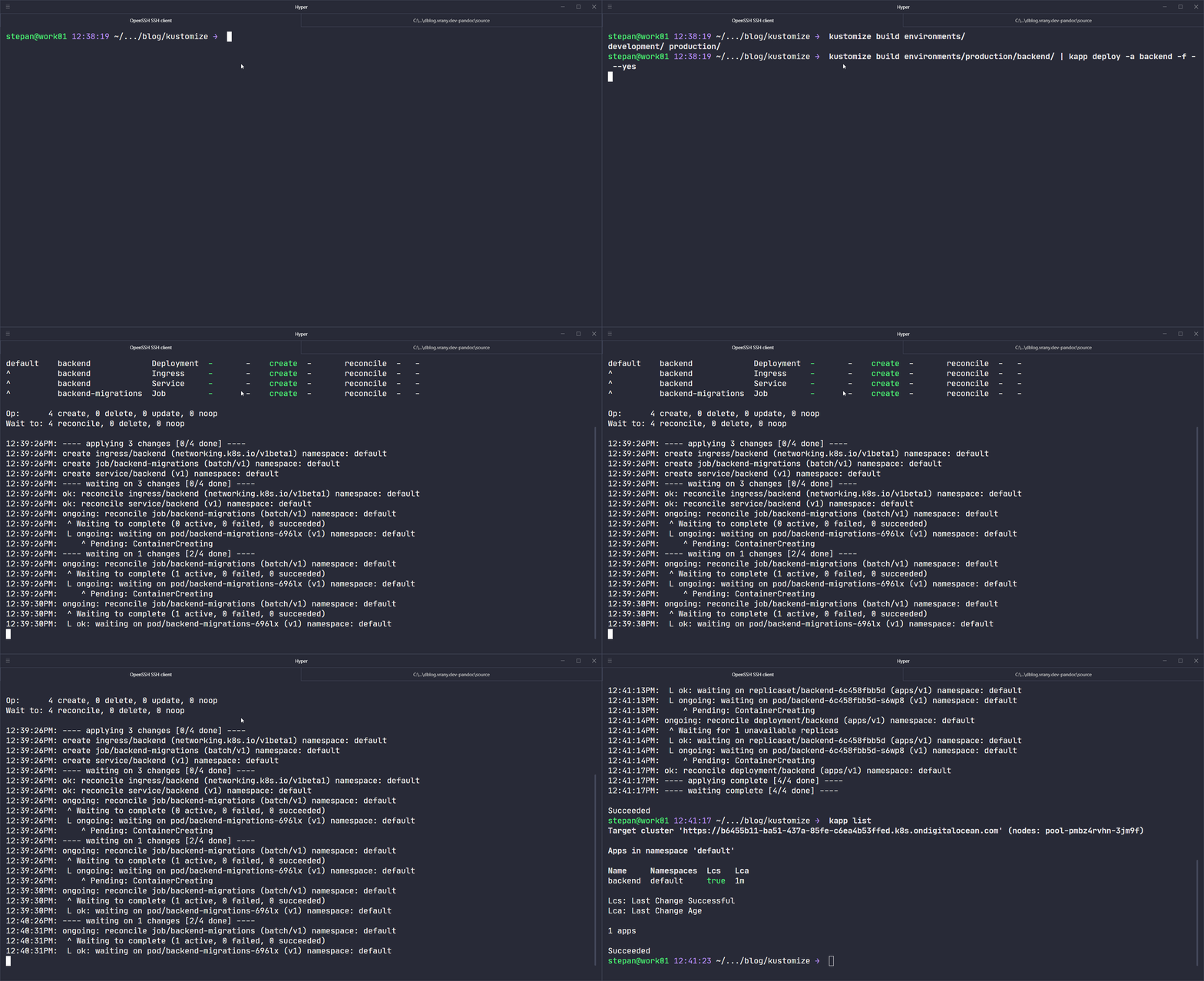
Here we are saying to Kapp that we want deploy a new version of the Deployment manifest
after the migrations run successfully. Let's test this scenario with previously created
resources!
## garbage collection
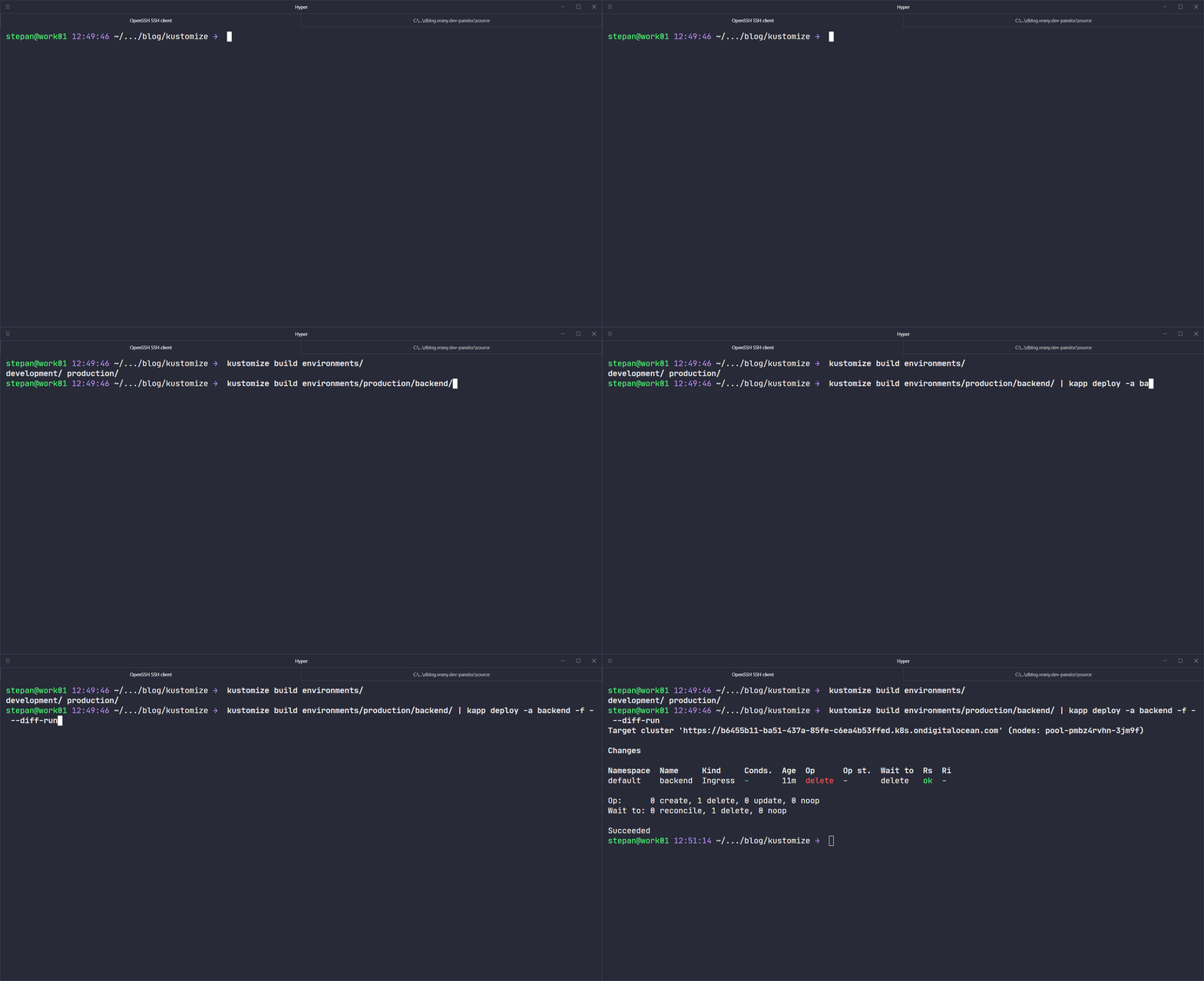
What if we delete ingress from our stack? Will Kapp delete them from cluster?
It's a yes! Kapp can handle even this highly demanded requirement.
## Wrap
Hey, I'm not telling you to stop using Helm. I'm just showing you that Internet
is full of tools that can help you with the similar matter. So if you're not so
happy with Helm, you can take a look around and choose some different tool that
does the job.
There are Jsonnet, [Tanka](https://github.com/grafana/tanka) and a lot of different
tools. Some of them can handle multiple tasks, some of them are single-purpose as Kapp.
But don't forget that one tool does not necessarily cover all the requirements.
The key is always composition.